
Key takeaways
- Agents fetch HTML and keep the words. Layout, images, and menus do not survive that pass.
- See, read, access, and analyze are one question: can an agent state your facts without guessing?
- ChatGPT can read a webpage when browsing is on. It still skips prices in images, PDF menus, and facts behind a click.
- A Site Scan shows the gaps. An llms.txt file is the brief that closes them.
People ask this because a customer already did. Someone typed “who can fix my boiler this week” or “best accountant for a small clinic” into an assistant, and the answer named a competitor. Your page is public. The assistant still did not use it.
The questions below are the ones owners type next. They sound different. They are the same worry, asked six ways.
How do AI agents see your website?
They do not see the layout you designed. An agent fetches the HTML, drops the scripts, the styles, and most of the images, and keeps the words. Headings, paragraphs, lists, and links survive. A hero photo, a price inside a slider, and a phone number drawn on a banner do not.
Turn the design off and read only the text. If a stranger could not list what you sell, what it costs, when you are open, and how to reach you, the agent cannot either. That stripped text is the website it sees.
How do AI agents read websites?
Seeing the text is the first step. Reading it is a budget. The agent converts that text into tokens and pays for every one. A homepage full of menu labels, cookie copy, and repeated slogans can cost thousands of tokens and still hide the offer. When the bill gets high, the agent stops and answers from whatever it already has, including an old directory listing.
Estimated agent research cost per business
Without AI Profile
With AI Website Profile
Based on mid-tier LLM pricing (~$3/M input tokens). Actual costs vary by model and provider.
The walk-through of that pass, from the HTML fetch to the moment the agent gives up, is in What Happens When an AI Agent Tries to Read Your Website. The short version: the agent wants five facts. What you do, who you serve, what it costs, where you are, and how to start. Everything else is weight.
Can AI read a website?
Yes. Fetching a public page is ordinary. Can AI read my site? is the same question pointed at your own domain. The useful test is whether the answer comes out right: services, price, hours, and a way to contact you, with nothing invented to fill a gap.
A page can be full of text and still be a poor source. “Solutions that scale” gives the agent a tone and no offer. “Emergency call-out, weekdays 7am to 7pm, from $149” gives it a sentence it can repeat.
Can AI access my website?
Access is permission to fetch the URL. Reading is what happens after the fetch. A login wall, a blocked crawler in robots.txt, or a page that only appears after a click stops access. A public page that is open and messy still gets fetched, and the agent guesses.
Check robots.txt before you blame the copy. If GPTBot, ClaudeBot, or Google’s crawlers are disallowed, those agents never arrive. If they are allowed and your facts are scattered, they arrive and improvise. Best Practice robots.txt for the AI Age covers which paths to close and how to point the agents you want at a profile.
Can ChatGPT read a webpage?
When browsing is on, ChatGPT can open a URL and summarize it. It reads the text it can extract, then writes a short answer. It skips a PDF menu, a price that exists only in an image, and a detail that appears after someone clicks through to book.
Try it on your own homepage. Ask for your services, your prices, your hours, and your service area. The blanks and the wrong details in that reply are the same blanks a customer’s assistant hits. Why AI Assistants Don’t “Read” Your Website Like Google Did explains why a page that ranks in classic search can still fail this test.
Can AI analyze my website?
Analyze means compare and score, not only quote. Agents look for a structured profile, schema, a sitemap, and facts that match across the pages they open. When those signals are missing, the “analysis” is a guess presented as a recommendation.
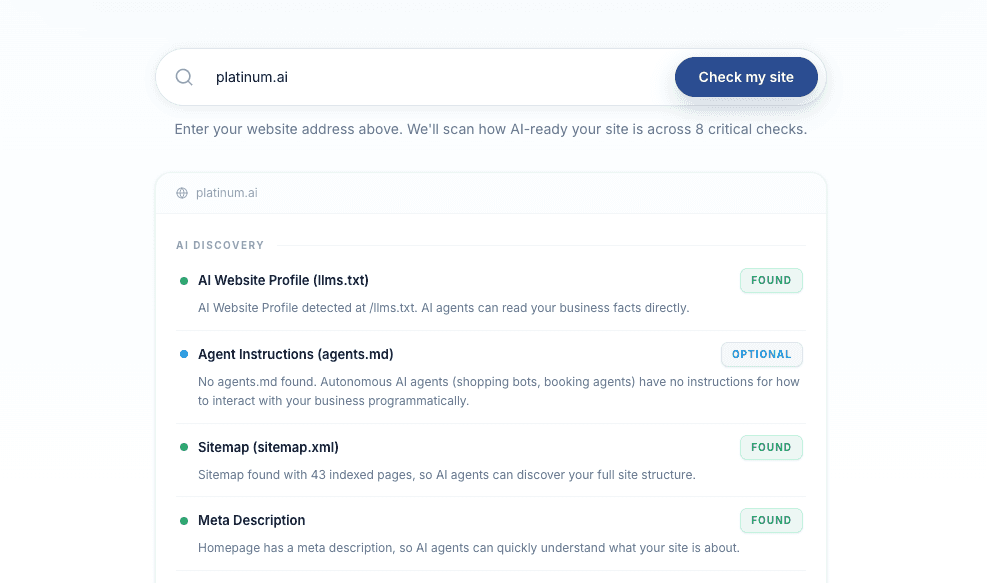
A Site Scan runs that check on your domain: llms.txt, sitemap, structured data, crawler access, and how many tokens a homepage costs. The free AI Readiness Scanner lists the eight checks. The result is a plain score of what an agent can actually use.
The file that makes the analysis easy is /llms.txt, an AI Website Profile in plain text. It states who you are, what you offer, what it costs, and how to reach you. The site your customers see stays as it is. The agent reads one brief instead of reconstructing the business from menus and banners.
Run a Site Scan on your domain. It shows the gaps in the same terms an agent uses when it decides whether to trust you.